Research
Transcript timestamps: how to use them and keep them accurate

Dylan de Heer

Transcript timestamps connect a passage of text to a position in its source recording. A marker such as [00:14:32] usually means fourteen minutes and thirty-two seconds from the beginning of that file. It helps a reader find the passage, hear the surrounding conversation and check whether the transcript represents it accurately.
The useful question is not simply whether a transcript has timestamps. It is whether those timestamps still point to the right recording, at the right moment, with enough context to verify what was said.
This guide explains the common formats, how to choose a sensible level of detail, and what to check when timings drift or disappear. The examples are fictional and use elapsed time from the start of a recording.
What does a transcript timestamp tell you?
A timestamp is a location reference. In transcription, it links text to a point in an audio or video file; speaker labels separately indicate who is speaking. These are related pieces of information, but one does not establish the other. A correctly timed passage can still have the wrong words or the wrong speaker. Way With Words explains the roles of timestamps and speaker identification.
Consider this fictional entry:
[00:14:32] Participant 04: I could find the report, but I did not know whether it was the latest version.
The marker gives you a place to start looking. It does not tell you when the sentence ends, whether the wording has been checked, or whether this concern occurred in other interviews. Keep those questions separate when you reuse the passage.
For a working transcript, write a short convention at the top: “Times are elapsed from the start of interview-04-original.m4a. Each marker identifies the beginning of the following speaker turn.” That small explanation removes ambiguity for someone who did not create the document.
Minutes and seconds, hours, and ranges
Common readable forms include [14:32] for minutes and seconds and [00:14:32] for hours, minutes and seconds. Use a consistent convention throughout a document. The longer form is helpful when recordings exceed an hour or several people will exchange references.
A range, such as 00:14:32–00:14:48, identifies a span rather than a single point. It is useful when requesting an excerpt or checking a complete quotation. Make clear whether the range includes the interviewer's question, just the answer, or a little surrounding audio.
Do not confuse elapsed recording time with the time of day. An interview starting at 09:00 does not make a marker of 09:12 mean twelve minutes into the file. Label wall-clock references explicitly if you need them, and retain the elapsed position used by the media player.
Choose timestamp spacing around the reader's task
There is no single spacing that suits every transcript. A person reading for meaning has different needs from someone locating a short quotation or preparing timed captions. Transcription services may offer markers at fixed intervals or around speech segments; agree the convention before treating the output as interchangeable. Way With Words describes time-coded transcript options.
At speaker changes
Marking each speaker turn gives a practical route back to a conversation. It works well when readers need to check who answered which question. Long uninterrupted answers may still need additional markers: a single timestamp at the start of a five-minute response leaves substantial searching to do.
Use stable participant labels and check them independently of timing. If two speakers overlap, a neat sequence of labels does not prove that the underlying audio is equally clear. Preserve an uncertainty note rather than assigning a confident identity from context alone.
At fixed intervals or paragraph boundaries
Regular markers can make a long recording easier to navigate even when nobody changes speaker. Paragraph markers can keep a reading copy cleaner. The trade-off is precision: a marker near a paragraph may locate the general discussion without identifying the first word of a quotation.
Choose and state what the marker means. “Approximately every minute” is a different promise from “the start of every paragraph”. If timings are approximate, say so. Do not display extra decimal places as though they establish accuracy.
For selected quotations and clips
When a passage will appear in a report, presentation or media edit, check its own start and end positions. General transcript spacing is a navigation aid; the selected excerpt needs a closer review.
Listen before and after the proposed boundary. A quotation beginning with “that” may depend on the preceding question. An answer ending with “but” may change meaning in the next sentence. The most useful range includes enough context to interpret the words, not just the shortest segment that contains them.
A timed transcript is not automatically a caption file
A readable transcript might contain one marker beside a long paragraph. Captions need information about when each piece of text appears and disappears. The WebVTT specification, for example, defines cues with start and end offsets associated with their text. Simply adding occasional timestamps to a document does not create that cue structure. W3C's WebVTT specification sets out the timing requirements.
If your destination is a video player or editing application, confirm the file format it accepts and inspect the imported result. A correct-looking time in a Word document does not guarantee a usable caption track. Caption segmentation, reading time, speaker changes and synchronisation need their own review.
Keep the purpose of each file clear: the transcript supports reading and source checking; a caption file supports timed display. You may need both. Do not promise a subtitle export just because an app shows timestamped transcript passages.
How to check transcript timestamps against the recording
Start with the original media file and the exact transcript you plan to share. If you are still preparing the text, our guide to transcribing a research interview covers the broader correction and attribution process.
Confirm the source. Check the recording title, file version and duration. Make sure you are not comparing a full interview with an edited extract or a second recording of the same session.
Choose clear reference points. Pick recognisable speech near the beginning, middle and end. Avoid using silence or an indistinct sound as your only anchor.
Seek to each marker. Check whether it reaches the passage according to the stated convention. A paragraph marker may precede the target sentence; a claimed sentence-start marker should identify that sentence.
Listen around the passage. Verify the words, speaker and context separately. Correct timing cannot compensate for a missing negation or an incorrectly attributed answer.
Record what you checked. Note the source version, the points reviewed and any remaining uncertainty. Sampling can reveal problems; it cannot certify every timestamp in a long file.
For a quotation that will carry an important claim, check that exact passage even if the sample points passed. The final use should determine the review depth.
Checking a source in Weeve
Weeve's Chat can present sources from stored recording content. Open a transcript source to inspect the passage and its available timing, then compare it with the retained recording audio before reusing the wording. Check whether the cited material is a transcript, a summary or a note: these are different kinds of evidence. Weeve Chat provides the source-review workflow.
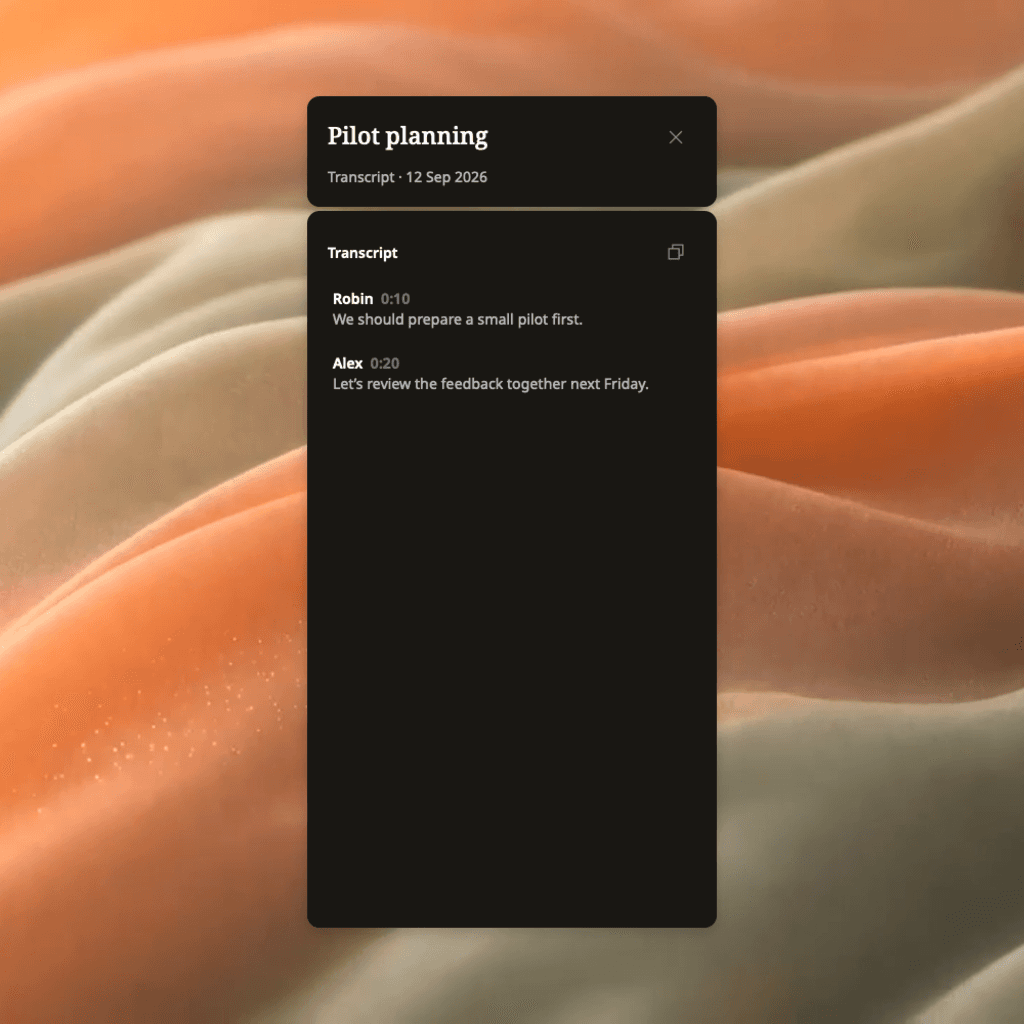
The screenshot uses demonstration content. A visible source reference helps you return to stored material; it is not a guarantee that transcription or an AI interpretation is correct. If the audio is no longer retained or available, state that you checked the text only. Do not claim that listening verification happened.
Weeve supports local AI processing and optional external providers. If you use an external provider, review that setting before working with sensitive material; do not assume every AI request stays on the Mac.
Why timestamps stop matching
When timing looks wrong, first identify the pattern. Applying a blanket offset before checking the source can hide the real problem.
Every passage is displaced by roughly the same amount
A constant difference can occur when the version you are playing has an introduction added or removed. For example, deleting the first twenty seconds means a passage formerly at 00:05:00 may appear at 00:04:40 in the edited file.
Confirm this at several points before changing anything. If the difference stays constant and there are no other edits, a documented offset may be appropriate in your editing workflow. Preserve the original timed transcript and label the adjusted copy with the media version it belongs to.
The difference grows through the recording
Progressively changing alignment is not explained by a single offset. Check that the text and audio came from the same recording, that no sections were removed, and that the media was not shortened or stretched during processing. Verify the exported file rather than relying on how playback feels at a selected speed.
Return to the original pair before attempting repairs. If the cause remains unclear, realign or retranscribe against the intended media and review the result. Avoid guessing new timings from paragraph length or average speaking speed.
Only passages after a particular point are wrong
A cut in the middle of a recording can leave earlier timings correct and later ones displaced. Several cuts create several different relationships. A single global adjustment will not fix them all.
Keep a record of edits or use the original media for evidence references. When sharing an edited clip, distinguish its own playback time from its position in the full recording. “00:18 in this clip; 00:14:32 in interview-04-original” gives reviewers both routes back.
The transcript has lost its markers
Look for an original export or an app view that still retains timing. A plain-text copy may have omitted information that remains in the source document.
If only untimed text remains, you need the recording to establish reliable positions. An AI assistant can reformat text, but a plausible sequence of timestamps generated from text alone is not evidence of where those words occurred. Mark unavailable timings as unavailable instead of inventing them.
Remove clutter without losing the route back
For a report or a long reading session, a timestamp on every short line can be distracting. Create a separate reading copy with fewer visible markers while retaining the original timed version. Keep a recording identifier and a source range beside any quotation that needs to be checked later.
Avoid deleting timing from the only copy simply to improve presentation. Likewise, do not copy fragments into a new document and leave their recording identity behind. A reference of 00:14:32 is ambiguous when the project contains twenty interviews.
Before handing over a transcript, check that another person can identify the recording, interpret the time format, locate a selected passage and understand what has been verified. That is the practical standard: a timestamp should provide a dependable route back to the evidence it represents.

