Product updates
Bot-free isn't cloud-free: where AI meeting notes actually go

Dylan de Heer

Bot-free used to be a differentiator. Now it is mostly a capture option.
Otter, Fireflies, Fathom, Granola and tl;dv can all record without adding a visible participant, in at least some situations. Fathom added bot-free capture as recently as April 2026, which tells you how quickly this stopped being a reason to choose one tool over another. The meeting does feel more natural without a named bot sitting in the sidebar. That part is real.
The data still goes to the cloud.
This is the gap worth understanding before you pick a tool on the strength of the phrase. Bot-free describes how the recording starts. It says nothing about where your conversation ends up.
The bot was never the whole privacy question
An AI note taker has several stages:
Capture audio.
Transcribe speech.
Separate speakers.
Generate notes or analysis.
Store the result.
Bot-free tells you only how stage one begins.
Otter's desktop app records from your machine with no bot in the call, then uploads to Otter. Fireflies' desktop app captures without a bot and without a bot icon in the participant list, then processes and stores through Fireflies. Fathom now lets you choose per meeting between bot-free transcription, bot-free audio capture, or full video with the bot, and all three feed its hosted workspace. Granola has always been bot-free and uses cloud transcription and cloud AI. The tl;dv desktop app records system audio in the background on any platform that outputs audio, then uploads to its service.
Those products offer useful security controls, retention settings and training commitments. Several of them are careful and specific about it. They remain cloud meeting systems.
What bot-free genuinely fixes
It would be dishonest to treat this as pure marketing, because bot-free solves real problems.
The social one is the biggest. A visible bot changes the meeting. People notice it, and some of them talk differently once they have. Removing it means the conversation stays a conversation, and the consent discussion happens between people rather than being announced by a piece of software that has already joined.

The practical ones matter too. No bot means no calendar auto-join surprises, no request for admin approval on a locked-down Teams tenant, no integration to authorise against your Google Workspace, and no failure when a platform blocks unknown participants outright. It also works for the meeting that has no dial-in at all, the one happening across a desk.
Those are genuine advantages. None of them is a privacy guarantee.
Where the notes actually go
Follow the audio past stage one and the chain is longer than most people expect. The recording leaves your machine. A speech-to-text provider turns it into a transcript. A language model provider turns that transcript into a summary. The result is stored in a database, in a region, under a retention policy. That is typically three or four companies handling your meeting, not one.
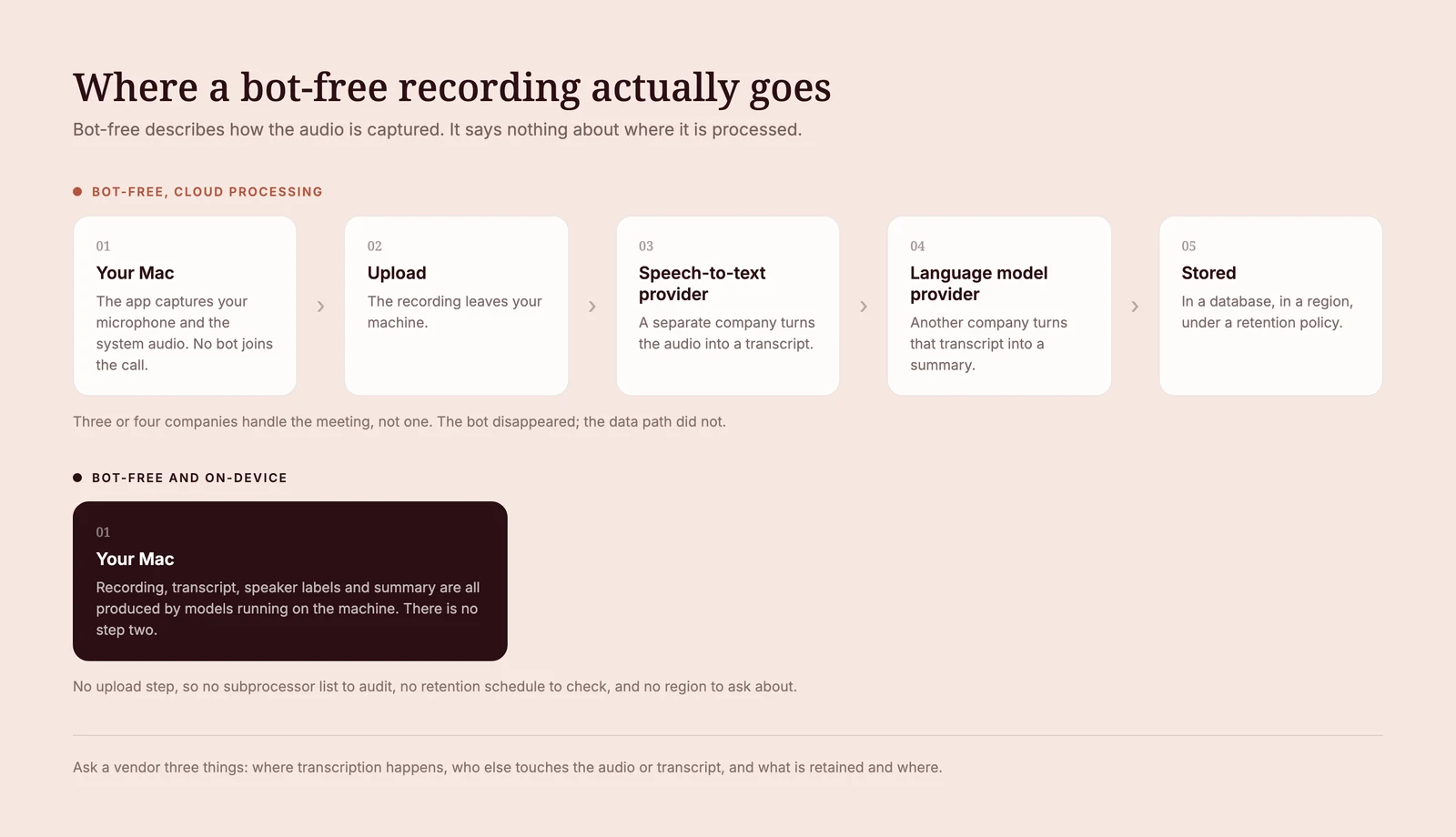
You can check this yourself, and the better vendors make it possible. Granola is a fair example precisely because it publishes the detail. It does not put a bot in your call, it captures your microphone and your computer's meeting audio, and it says plainly that it does not store meeting audio, which is a genuinely good decision. Its security page also names who else is involved. Transcription runs through providers like Deepgram and AssemblyAI. The AI models come from OpenAI and Anthropic. Notes are held in a US-hosted AWS virtual private cloud, encrypted at rest and in transit, and backed up daily. Granola's own FAQ is candid about why it works this way: it tried running these steps on the device and found the computation too heavy.
None of that is a scandal. It is ordinary, competent architecture, published openly, and it is more transparency than most of the category offers. It is simply not the same thing as the conversation staying with you. If your professional duty attaches to the words in that meeting, the number of parties in the chain is the thing you actually needed to know, and "no bot joined the call" never told you.
This is usually the moment people stop trusting cloud meeting notes. Not because anything went wrong, but because they finally read the chain and found it longer than the promise.
Weeve keeps the complete content path local
Weeve records microphone and system audio on an Apple Silicon Mac.
After the meeting, speech recognition, speaker diarisation and summary generation all run on the device. The transcript, the speaker labels, the notes and the optional source audio stay in local app storage.
No meeting bot. No cloud transcription provider. No hosted conversation archive. There is a fuller account of the design in the write-up of how Weeve stays private by default.
Be precise about the promise, because the precision is the point. Weeve still uses online services for sign-in, billing, updates, downloads and content-free analytics, the same as most desktop software. What it does not do is send your meeting anywhere. The commitment is specific, and it is worth stating in exactly those terms: meeting content stays on the Mac.
That is a stronger claim than bot-free, and it is a different one.
It also works offline, in person and across apps
Weeve does not require a meeting URL.
Use it in any Mac conferencing app. Put the Mac on the table for an in-person conversation. Import audio you already have. Once the models are installed, the core workflow continues offline.
Projects add context across related conversations. Templates shape what the notes focus on. Hold-to-dictate covers the smaller voice input that does not need a whole recording.
This is a complete private conversation workflow, not a quieter way to feed a cloud recorder.
What cloud meeting tools get right
Cloud centralisation is what enables live collaboration, mobile access, team-wide search, video, integrations, shared reporting and enterprise administration. Those capabilities are real and they require a server. Teams that live in them get genuine value, and the companies building them are doing serious work.
Those are valid reasons to choose a hosted product when the meeting content is approved for that environment.
Weeve's audience starts from a different requirement: the conversation is sensitive enough that avoiding the upload matters more than centralising every feature. For those professionals a local content pipeline is the obvious answer. For everyone else it honestly is not, and a cloud tool will serve them better.
The honest local trade-off
Weeve processes after capture rather than during it, and it uses the Mac's own resources to do it. Speaker labels can need a review before you rely on them. Local content also means you are responsible for backups and for sensible device security, because there is no copy on a server to fall back on.
Those responsibilities are understandable, and they sit with you. For confidential work that is the trade most people want: your own device security instead of several vendors' processing and retention terms applied to every important conversation you have.
Weeve is also Mac only today, with no Windows client and no mobile app.
The practical test
Ask every AI note taker the same five questions:
Where is speech converted to text?
Where does the summary run?
What remains after processing, and for how long?
What happens by default, before you change any settings?
Which features disappear if cloud storage is switched off?
A vendor that answers all five plainly is being straight with you, whatever the answers turn out to be. Vagueness on any of them is itself an answer.
Weeve's answer is short: the meeting-content workflow runs on your Mac. Download Weeve for Mac and record the next conversation without either problem.
Consent does not change either way. Ask before you record, every time, whatever tool you use. There is a fuller breakdown in the guide on whether it is legal to record a meeting. What changes with on-device capture is not whether you have to ask. It is what you can honestly promise when they say yes.
No bot is good. No cloud content path is the real privacy feature.
FAQ
Does bot-free mean my meeting data stays private?
No. Bot-free describes how the audio is captured, not where it is processed. Otter, Fireflies, Fathom, Granola and tl;dv all offer some form of bot-free capture, and all of them transcribe, summarise and store the result in their own service. To keep the data local, stages two through five have to run on your machine as well, which is a separate claim you have to check for specifically.
What is an AI note taker without a bot?
It is a tool that captures a meeting without joining it as a participant, usually a desktop app that records your microphone and the system audio your machine is already playing. Nothing appears in the participant list, so everyone else sees a normal meeting.
Do bot-free notetakers send my audio to OpenAI or Anthropic?
Some do, and the honest ones publish it. Granola's security page names Deepgram and AssemblyAI for transcription and OpenAI and Anthropic for its AI models. Others use different providers, and a few process entirely on-device and use none. Ask for the subprocessor list; it is a reasonable question and a straight vendor will answer it.
Is there a notetaker where the meeting never leaves my computer?
Yes. Weeve runs the recording, transcription, speaker labels and summary on your Mac using local models, so no meeting content is uploaded. Meetily is a genuinely local open-source option for people who want to configure it themselves. The trade in both cases is scope: no shared cloud workspace, and Mac or self-managed setup rather than every platform.
Does Weeve use the internet at all?
Yes, and it is worth being exact about what for. Sign-in, billing, updates, downloads and content-free analytics use online services, the same as most desktop software. Your meeting content is the part that does not travel: the recording, the transcript, the speaker labels and the notes are produced and kept on the Mac.
Why do people avoid notetaker bots in the first place?
Mostly because of what a visible bot does to the conversation. It announces to everyone present that a third-party service is in the room, and people talk differently once they know. The practical reasons follow: no calendar auto-join, no admin approval on locked-down tenants, and it still works when a platform blocks unknown participants.
Can I check what a notetaker does with my recording?
Usually yes. Read the security or trust page rather than the marketing page, and look for the subprocessor list, the retention policy and the training-data statement. If a vendor will not say where transcription happens or who else receives the data, treat that silence as information. You can also test the output first: Weeve's free browser-based transcriber produces a transcript without the file leaving the page.