Business
Meeting agenda vs minutes: the difference, with a worked example

Stefan Weiss

A meeting agenda sets out what you intend to discuss and accomplish. Meeting minutes record what actually happened: the relevant discussion, decisions, actions and unresolved questions. Prepare the agenda before the meeting; capture and review the minutes during and afterwards. They can share one document, but planned outcomes must remain visibly separate from confirmed outcomes.
The distinction matters whenever a team moves from preparation to follow-up. “Approve the proposal” on an agenda is an intention. “The proposal was approved” in the minutes is a claim about an event. Copying the first into the second without checking can turn unfinished business into an apparent commitment.
Agenda and minutes serve different readers at different times
An agenda helps an attendee prepare and helps the facilitator guide the conversation. Minutes help someone understand the outcome later, including a colleague who could not attend. Lumen Learning’s business communication chapter distinguishes the agenda’s planning role from the minutes’ record of significant discussion, decisions and actions.
The agenda answers: what are we here to do?
Useful agenda information includes the purpose, participants, discussion topics, preparation required and the outcome sought for each topic. Time allocations can help a facilitator decide where to focus attention.
An agenda item such as “Website” tells people very little. “Choose which two website improvements to prioritise, using the support themes circulated beforehand” gives them a specific preparation task and a decision to work towards.
It is still a proposed outcome. The group may discover that the evidence is incomplete, that a necessary decision-maker is absent or that a different issue is more urgent.
The minutes answer: what did we establish?
Minutes should distinguish a discussion from a decision and a decision from a task. In ordinary team work, useful entries explain what was agreed, what remains unresolved and who accepted the next action. Record a deadline only when it was actually agreed or subsequently confirmed with that status made clear.
Minutes are not automatically a transcript. A transcript preserves spoken words; minutes organise the relevant outcomes. For a detailed minute-taking workflow, use our guide to taking meeting minutes.
A practical comparison
Timing: an agenda is prepared and shared before the meeting; minutes are captured during it and reviewed afterwards.
Direction: an agenda looks towards a conversation; minutes look back at its outcomes.
Typical language: an agenda says “review”, “discuss” or “decide”; minutes say “agreed”, “deferred”, “requested” or “no decision reached”, when supported.
Ownership: the organiser or facilitator usually coordinates the agenda; a designated note-taker prepares the minutes for the appropriate review.
Completion check: an agenda is usable when people know how to prepare; minutes are usable when readers can distinguish what happened from what remains to be done.
These are practical distinctions for team meetings, not universal governance rules. If your organisation uses a formal approval process, follow its requirements for attendance, resolutions, corrections and retention.
A worked example: the same topic before and after a meeting
Consider a fictional project team deciding whether to launch a revised onboarding flow. The names, dates and details below are illustrative, not a customer story.
Before: the agenda item
Item 3: Decide whether the onboarding pilot can start on 28 October.
Preparation: read the pilot scope and the latest support-capacity estimate.
Discussion lead: Aisha.
Intended outcome: agree a start date, or identify the evidence needed to choose one.
Time allowed: 15 minutes.
This is a useful agenda item because the requested decision and relevant material are explicit. It does not say the pilot is approved. Even the proposed date remains a proposal.
During: the working notes
The team discusses two open issues. The revised screen is ready, but the support estimate is incomplete. Ben offers to update that estimate by 23 October. Aisha suggests reviewing the date again once the estimate is available. Nobody confirms a launch date.
Working notes may be rough, repetitive or incomplete. Their job at this stage is to preserve enough evidence to produce an accurate record. Do not polish them into certainty while the outcome is still unclear.
After: the minutes entry
Item 3: Onboarding pilot start date. No launch date was agreed. The group deferred the date decision pending the updated support-capacity estimate.
Action: Ben will provide the revised estimate by 23 October.
Follow-up: review the proposed start date once the estimate is available.
Notice the changes. The minutes preserve the topic but replace the requested decision with the actual result. They identify a specific action and leave the unconfirmed date unconfirmed.
An incorrect version would be: “The pilot will launch on 28 October. Ben will handle support.” That sentence invents both a decision and a broader responsibility than the example supports.
Next meeting: a new agenda item
Review the updated support estimate and decide the pilot start date.
The next agenda links to the previous outcome and the new estimate. It does not paste the old proposal as an approved fact. If the estimate is still unavailable, the organiser can change the purpose to resolving the missing dependency rather than pretending the decision is ready.
How the two documents should connect
Keep a stable reference for each substantive topic. An item number is enough for a small meeting; a linked heading or project reference may work better for a recurring series. The goal is to follow one issue from planned discussion to recorded outcome without relying on memory.
For each agenda item, ask after the meeting:
Was it actually discussed?
Was a decision reached, or was the topic deferred?
What action, owner and deadline were explicitly agreed?
What must be checked before the topic returns?
Use “not discussed” when the meeting ran out of time. Use “deferred” when the group chose to postpone the matter. Use “no decision reached” when discussion happened but did not produce agreement. These labels describe different situations and help the next organiser prepare appropriately.
Do not force every topic to produce a task. A useful outcome might be a clarified constraint, a rejected option or confirmation that no change is needed. Equally, a task can exist without a final decision: someone may agree to gather evidence before a choice is made.
Can an agenda and minutes live in the same document?
Yes, for everyday team work, a shared document can hold both. The important question is whether a reader can tell which material is a plan and which is a reviewed record.
One workable arrangement is to keep the original agenda item at the top of each section, then add clearly labelled Outcome, Actions and Open questions beneath it. Retain a meeting date and document status at the top. Once reviewed, preserve that version rather than letting next week’s preparation silently replace it.
Separate documents are often clearer when the agenda is widely circulated before the meeting, when minutes need a distinct review process, or when access to the outcome should differ from access to preparation material. Choose the arrangement that fits the audience and review process, not the one with the fewest files.
Avoid the rolling-document trap
A document headed “Weekly meeting” can become ambiguous after several weeks of edits. A task marked “done” today may sit beside a decision recorded last month with no indication of when either status changed.
Keep dated meeting records and distinguish current task status from the historical minutes. If you maintain a separate action tracker, link it from the minutes. Update progress there without rewriting the original commitment as though completion happened in the meeting. Our action-item tracking guide covers that next stage.
Decide who prepares, checks and maintains each record
Agree these responsibilities before the meeting starts. The organiser can collect agenda suggestions, but someone needs to decide which items belong in the meeting and what preparation is required. A note-taker needs to know whether they are capturing an informal team record or following a more formal process.
During the meeting, the facilitator can close a topic by asking the group to confirm the outcome: was a decision made, who owns the next action, and what is still unresolved? This gives the note-taker an opportunity to flag ambiguity while the relevant people are present.
Afterwards, identify who reviews the draft and how corrections are handled. Avoid treating silence as approval unless your agreed process explicitly says it is. When a correction changes a decision or commitment, make the change visible to the people who relied on the earlier version.
You do not need to assign every role to a different person in a small team. You do need to make the responsibilities explicit enough that the agenda, review and follow-up do not fall between people.
Use recording assistance for the right stage
A recording can support checking the minutes, where recording is permitted and participants understand the arrangement. It can also provide context for the next agenda. Those are different requests, so give the assistant a different task for each.
Weeve’s recording Chat actions include Summarize decisions, List next steps and Outline next meeting. The current next-meeting action asks for proposed agenda items to be separated from decisions already made, including unresolved questions and follow-ups. That distinction matches the workflow here: a retrospective record first, a prospective plan afterwards.
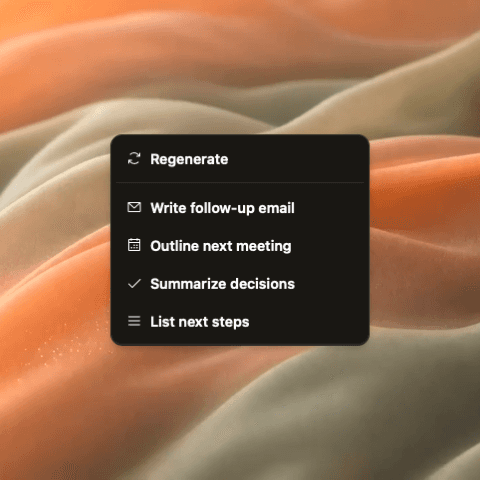
For the minutes, ask for supported outcomes and review them against the recording. For the next agenda, ask which unresolved questions or dependencies require attention. Keep proposals labelled as proposals and check that any named owner or deadline is actually supported.
The generated output remains a draft. It does not establish that the team approved a decision, that an action was completed or that a future date was accepted. Choose recording and AI settings appropriate for the material; optional external AI services can involve sending relevant content to the selected provider.
If you need more help preparing the conversation itself, our guide to preparing for a client meeting covers preparation from earlier discussions and current evidence.
Carry unresolved business forward without reopening everything
An unresolved item deserves a reason to return. “Discuss onboarding again” restarts a broad conversation. “Decide the pilot date now that the support estimate is available” explains what changed and what is needed.

Before adding an old topic to a new agenda, check its last recorded outcome, the remaining dependency and any new information. If the task was simply to obtain a figure, the update may be handled asynchronously. Reserve meeting time for the discussion or decision that still needs the group.
If a previous decision is being reconsidered, say so explicitly and link to the earlier record. Keep the old minutes intact, then record the new decision and its relationship to the old one. This preserves the sequence of events for colleagues who join later.
A final check before sharing
Read the agenda as an attendee who has not seen the planning conversation. Can they tell why they are invited, what to read and what the group needs from them?
Read the minutes as someone who missed the meeting. Can they tell which outcomes were confirmed, which items remain open and what action is expected next? Can they distinguish the meeting’s record from later corrections or progress updates?
If either document fails that check, fix the ambiguity before sharing it. The agenda should make the next conversation easier to prepare for. The minutes should make the previous conversation easier to act on accurately.


