How to Dictate a Book: From Spoken Ideas to an Editable Draft

Dylan de Heer

To dictate a book, prepare a small section outline, speak one coherent passage into your chosen writing tool, check that the text was captured, and edit it in a separate pass. Start with one scene or subsection rather than an entire chapter. The useful result is a saved draft you can develop, not an impressive number of spoken words.
Dictation can supply the first version of a novel, a practical guide or a personal essay. It does not decide your structure, verify your facts or finish your prose. This guide gives you a repeatable writing process, including what to prepare, how to handle dialogue and corrections, and how to keep spoken material from becoming an unmanageable pile of transcripts.
Choose how your speech will become text
There are two basic routes: dictate into a document while you work, or record an audio file and transcribe it afterwards. Author Joanna Penn describes both approaches in her guide to dictating a book. Her account is an author's experience, not a guarantee that either route will improve your writing speed.
Dictating into a document keeps the draft close to the place where you will edit it. You can check insertion, add headings and save immediately. It suits a desk-based session where you can stop between passages. The main practical risk is losing track of the insertion point or assuming text has arrived before checking it.
Recording first separates speaking from text review. It may suit someone who wants to speak without watching words appear. It also adds work: name the recording, preserve the audio, transcribe it, identify the intended section and transfer the useful text. An unlabelled folder of recordings is not yet a manuscript.
Choose one route for your first trial. Switching between several applications while learning to compose aloud makes it harder to tell whether the difficulty comes from your writing method, recognition or document handling. If you are still deciding whether voice suits the task, use our dictation-versus-typing comparison before committing a whole project to it.
Prepare a section you can actually speak
Before starting the microphone, open the document where the passage belongs. Add a heading and a short outline in your own words. Keep it visible and brief enough to glance at without reading continuously.
For a nonfiction subsection, identify:
The question the reader needs answered.
The main explanation or argument.
One concrete example.
Any fact or quotation that must be verified later.
The point that leads into the next section.
For fiction, identify who is present, what the viewpoint character wants, what interrupts that intention and what changes by the end of the scene. These are suggested planning prompts, not rules every novelist must follow. Their purpose is to give the spoken draft somewhere to go.
Separate source material from prose before you begin. Put a verified quotation in the document directly, with its source, rather than trying to reproduce it from memory. Use an obvious research marker for a missing date or reference. Dictation is a way to enter your writing; it does not make an uncertain fact more reliable.
A worked nonfiction outline
Imagine a fictional book about running a small design studio. The section question is: “How should a new project begin?” The outline contains three beats: clarify the decision the work supports, agree what is outside the project, and identify who can approve changes.
The writer might dictate an opening explanation, then a hypothetical example about a client requesting a website redesign without agreeing who owns the content. The next paragraph explains how that gap affects the initial brief. This is already a useful sequence: point, example, implication. It does not require the writer to improvise the entire chapter aloud.
Keep the example clearly hypothetical if it is invented. Do not let a smoothly dictated anecdote quietly acquire the status of a real client story.
Test the complete capture route
Use a short, disposable passage before the first serious session. Include a name, a number, a question and a paragraph break so you can see how your chosen setup handles them. Check the actual text, the selected input language and the destination document.
If you use Weeve, dictation on Mac inserts recognised text into the active text field. The current shortcut description is to hold the configured keys to dictate and stop to insert. Check your own configured shortcut rather than assuming a published key combination applies to every installation. Accessibility access is relevant when using Weeve's shortcuts in other applications.
Click the intended insertion point before speaking. When the passage ends, confirm that it appeared once, in the right place, before continuing. Test with the particular editor you plan to use; a successful result in one text field does not establish compatibility with every writing application or embedded editor.
Try punctuation commands only if your chosen tool documents them. Apple Dictation, Voice Control, browser voice typing and Weeve are different systems. Our Mac dictation command reference distinguishes that scope; it is not a promise that all those commands work in Weeve.
The expected result of this test is simple: you can start, stop, locate the inserted text, correct it and save the document. Resolve a failed step before dictating important material.
Draft in passages, with a clear stopping point
Speak one paragraph, one exchange or one explanatory unit at a time. Finish the thought, stop capture and check the result. You can lengthen a passage once the route feels reliable; there is no universal ideal session length.
Speak as though you are explaining the point to a specific reader. If you lose your place, pause and look at the outline. You do not need to fill every silence or restart the entire passage because one sentence was awkward.
Avoid mixing editorial instructions with manuscript prose. Saying “delete that” or “move this to chapter four” may produce literal text rather than performing an edit. Unless the tool supports the command you intend, stop dictation and make the change deliberately with the keyboard or editor controls.
When a sentence goes wrong, there are two useful options. Stop and replace the sentence now if it affects the next thought, or leave a visible marker and continue to a natural boundary. Choose consistently. Repeating several alternative versions aloud without marking your preferred one leaves an unnecessary puzzle for the later editing pass.
Handle dialogue and fictional names deliberately
Dialogue adds punctuation, speaker changes and names that may be unfamiliar to speech recognition. Start with a short exchange and inspect how it appears before dictating a long conversation.
If speaking punctuation breaks your concentration, draft the dialogue content in short blocks and format it afterwards. Keep each character's turn identifiable in your working text. Do not rely on the software to infer who is speaking inside a scene you are narrating alone.
Maintain a separate spelling list for characters, places and invented terms. Compare recognised text with that list during review. A custom vocabulary feature, where your tool supports one, can be helpful, but the finished manuscript still needs checking. Avoid replacing a common word everywhere merely because it sometimes represents a misrecognised character name.
Save the manuscript, not just the clipboard
After each useful passage, save in the writing application's normal document workflow. A clipboard is temporary working space. It is not a chapter archive or a backup system.
Weeve has a Keep dictation on the clipboard setting. When enabled, the dictated text remains available for another paste and replaces the clipboard's previous contents. When disabled, Weeve restores the previous clipboard after its paste flow. Choose this for the way you work, and still confirm that your passage is safely in the document.
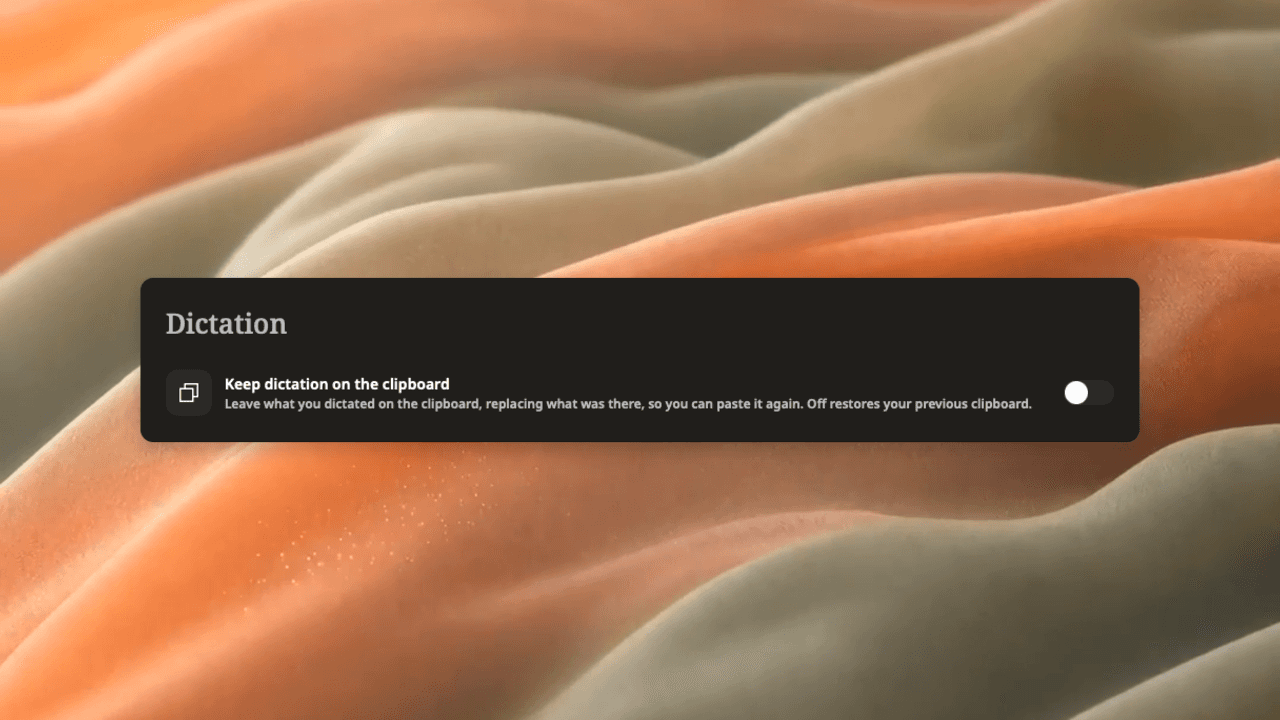
Native Weeve settings capture. The option controls clipboard behaviour; it does not save a manuscript.
If you record audio first, use a filename that identifies the project and section. A name such as “Studio book — chapter two — opening example — take two” is easier to place later than a generic recording date alone. Preserve the original until the transcript and intended draft have been checked, within whatever retention arrangements apply to your material.
Keep a clear distinction between raw speech, a corrected transcript and an edited chapter. They answer different questions: what was captured, what the speaker meant to dictate, and what the reader should finally see.
Edit in three passes
1. Check capture and recognition
Read the passage for missing lines, duplicate insertions, names, numbers and negatives. If you retained audio, use it to resolve uncertain wording. If no audio exists and the sentence is unclear, rewrite from your intended meaning rather than claiming to have verified the original speech.
Check the joining points between passages. A repeated introduction or missing transition may be a capture problem rather than a writing problem. Fixing these first prevents you from polishing a paragraph that does not belong there.
2. Shape the section
Return to the outline. Does the passage answer its question? Does the example support the point? Is a digression useful enough to keep, or does it belong elsewhere? Move and cut at this level before spending time on individual phrases.
A spoken draft can circle an idea several times. Keep the version that best serves the reader. You are allowed to make substantial changes because this is your authored manuscript, not a quotation of somebody else's interview.
3. Edit the prose and verify sources
Now work on sentence length, repetition, dialogue layout and transitions. Check every factual placeholder and quoted passage against its source. Read the result as writing, not merely as a transcript with fewer errors.
If you ask an AI tool to help rewrite a section, compare its output with your intended meaning and verified sources. Do not let it invent supporting facts, personal experiences or citations. Check where the selected service processes the text before giving it unpublished or sensitive material. Local dictation does not make a separate cloud rewriting step local.
Diagnose a difficult first session
You cannot start speaking. Reduce the scope to answering one question from the outline. A trial subsection is a better learning unit than “write chapter one”. You can also speak a rough explanation and then write the opening sentence by hand.
You keep correcting every word. Separate recognition checks from style edits. Correct a wrong name or misplaced insertion promptly; save an awkward but understandable sentence for the prose pass.
The text is accurate but rambling. This is a structure issue. Tighten the outline or shorten the unit you dictate. Changing transcription software will not necessarily provide a clearer argument.
The text goes into the wrong place. Stop and check focus, selection and the active document before the next passage. Keep a disposable test field available. If the same failure repeats in one application, investigate that insertion route instead of risking a long section.
Dictation feels less convenient than typing. Keep it for the tasks where it helps: a rough explanation, a scene idea or a difficult paragraph. A mixed writing process is a valid outcome. For capture failures, use the separate Mac dictation troubleshooting guide.
Evaluate one finished section before scaling up
Complete a small section through capture, correction, structural editing and saving. Compare the effort and quality with your usual process for a similar section. Include editing time; words spoken per minute alone will not tell you whether the method helps you finish a book.
You are ready to extend the workflow when you can reliably find the saved text, distinguish unfinished research from finished prose and resume at the next outline point. Keep that process consistent across the manuscript. The aim is to make writing easier to continue and easier to review, one useful passage at a time.